Social media auto posting software helps sellers, agencies, and marketing teams publish content more consistently without opening every account manually. If your team posts to Facebook groups, Facebook Pages, TikTok, Instagram, or other channels every day, manual posting quickly becomes a bottleneck.
The real goal is not to post more just for volume. The goal is to build a repeatable publishing system: plan content, prepare captions, choose the right audience, schedule posts, monitor what went live, and improve the next campaign. When this workflow is clear, auto posting becomes a productivity tool instead of a spam tool.

Quick Answer: What Is Social Media Auto Posting Software?
Social media auto posting software is a tool that helps you prepare, schedule, and publish posts across selected accounts or communities from one workflow. For online sellers, it is useful for product launches, daily promotional posts, content calendars, group marketing, and repeated campaign publishing.
Table of Contents
- Why auto posting matters
- Who needs auto posting software?
- A practical auto posting workflow
- Auto posting for Facebook groups and Pages
- Features to look for
- How MKT Post supports automatic posting
- Mistakes to avoid
- FAQ
Why Auto Posting Matters for Online Sellers
Online sellers often know what they should do: post product updates, test different captions, share offers in relevant communities, answer comments, and keep the brand visible. The hard part is doing it every day while also handling inventory, customer messages, packaging, delivery, and sales follow-up.
Manual posting works when you manage one or two accounts. It becomes messy when you manage many products, many groups, multiple brands, or several client accounts. A team can spend hours copying captions, uploading images, choosing groups, checking whether posts were published, and repeating the same process the next day.
Auto posting gives structure to this routine. You can batch content preparation, schedule campaigns in advance, and reduce repetitive work. That saves time, but it also improves consistency, which is one of the most important signals in organic social media marketing.
Who Needs Social Media Auto Posting Software?
Not every business needs automation on day one. If you only post once a week, a manual workflow may be enough. But if posting is part of your daily sales engine, software can make the operation easier to control.
Online sellers and small businesses
Sellers who promote products through social channels need visibility every day. Auto posting helps them prepare campaigns around new arrivals, flash deals, seasonal promotions, customer reviews, and frequently asked questions.
Facebook group marketers
Facebook groups can still be valuable when the content is relevant and the group rules are respected. Auto posting software helps teams organize which content goes to which group, instead of relying on scattered notes and manual copy-paste work.
Agencies and social media teams
Agencies often manage many accounts at once. A content calendar, publishing status, and approval workflow help the team avoid missed posts, duplicated content, and confusion between clients.
Affiliate marketers
Affiliate marketers need repeated content tests. They may test different hooks, products, audiences, and time slots. A structured auto posting workflow makes it easier to compare what works.
A Practical Auto Posting Workflow
Good automation starts before the publish button. The best teams treat auto posting as a content operations system, not a shortcut.

1. Choose one campaign goal
Start with the reason behind the posts. Are you promoting a product launch, collecting leads, warming up an audience before a livestream, pushing a flash sale, or building brand trust? The goal decides the tone, caption, creative, and call to action.
2. Prepare content in batches
Batch work is where automation becomes powerful. Prepare several captions, images, videos, product angles, and audience variations at once. This gives you more material to test without starting from zero every day.
3. Segment accounts and communities
Not every post belongs everywhere. Separate groups, pages, profiles, and channels by niche, audience interest, location, and campaign type. This reduces irrelevant posting and keeps the content more useful for the audience.
4. Schedule at realistic intervals
Do not overload every channel with the same post at the same time. Use a publishing rhythm that looks natural for the community and gives your team enough time to monitor comments and messages.
5. Review results after publishing
After the campaign goes live, check which posts received comments, clicks, messages, or sales conversations. Use that feedback to improve the next batch.
Auto Posting for Facebook Groups and Pages
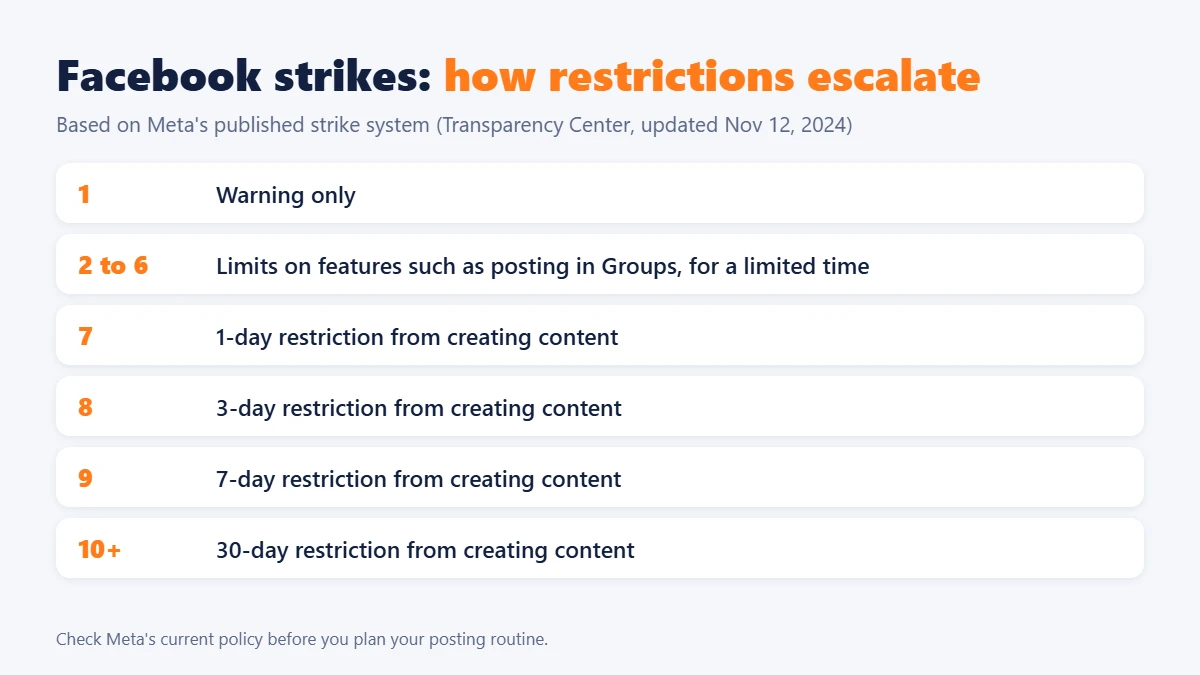
For many businesses, the strongest use case for auto posting is Facebook. Groups and Pages can help sellers reach specific communities, but they also require discipline. Posting the wrong content to the wrong place can reduce trust quickly.
Respect group rules
Before posting in groups, check whether promotions are allowed, whether there are specific posting days, and whether links are accepted. Automation should help you stay organized, not bypass community expectations.
Localize the message
A generic caption rarely performs well across every audience. Adjust the hook, product angle, and call to action based on the group or page. For example, a reseller group may care about margin, while a buyer group may care about price, quality, and delivery.
Track published posts
If you publish to many places, you need to know what went live. Tracking helps you avoid duplicate posting, identify groups that respond well, and follow up on comments faster.
Features to Look for in Auto Posting Software
The right software depends on your workflow. A basic scheduler is enough for simple publishing. A more serious marketing team may need account management, campaign organization, comment support, group targeting, and publishing history.
Bulk content preparation
You should be able to prepare many posts without repeating the same manual steps. This is useful for product catalogs, seasonal campaigns, and daily promotional content.
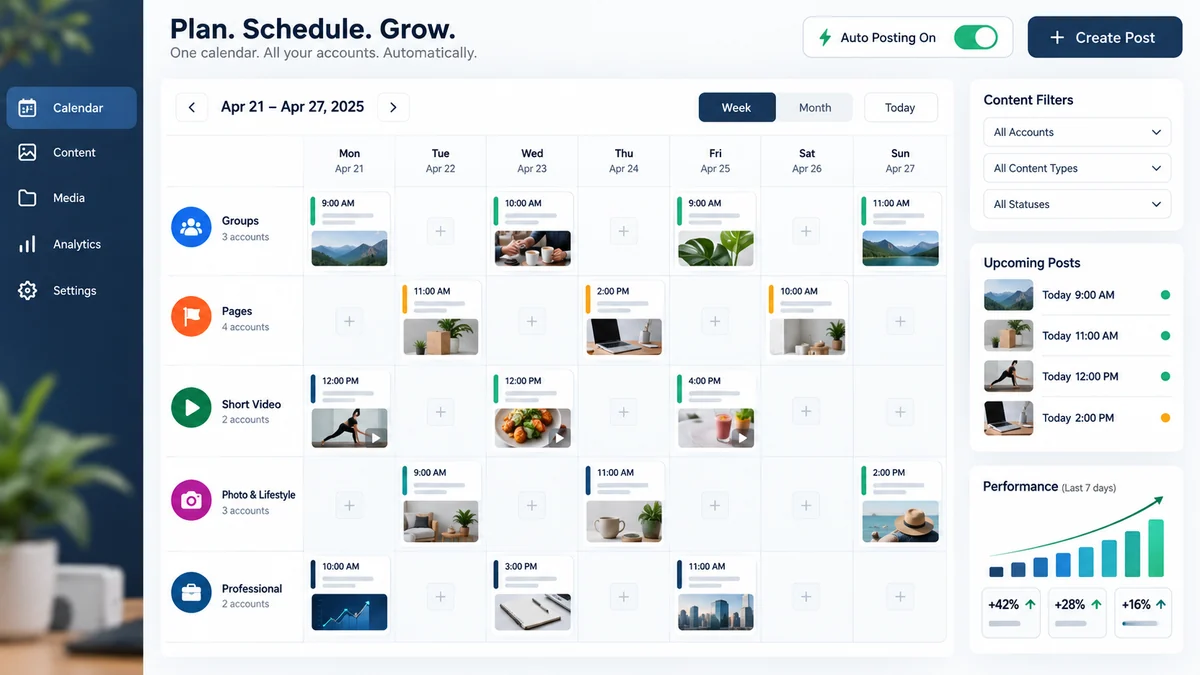
Scheduling and queue management
A good queue helps you see what will be posted, where it will be posted, and when it will go live. This reduces mistakes when several team members work together.
Group and account organization
If your strategy depends on Facebook groups or many pages, you need a clear way to organize accounts and communities. The goal is to publish relevant content to the right audience.
Publishing history
History matters because it shows what was published and when. It also helps your team review performance and troubleshoot missed posts.
Comment and message workflow
Publishing is only the first step. A useful system should support follow-up activity, because comments and messages are often where sales conversations begin.
How MKT Post Supports Automatic Posting
MKT Post is the most relevant product in the MKT Software ecosystem for this topic. The official MKT Post page describes it as software for automatic Facebook posting, with use cases around posting sales content, posting to joined groups, posting by group keywords, and tracking published posts.

This makes MKT Post suitable for sellers and teams that rely on Facebook marketing. Instead of manually posting one by one, the team can organize a campaign and reduce repetitive publishing work. It can also support related Facebook workflows such as comments, messaging, and account activity, based on the features listed on the official product page.
You can view the product information here: MKT Post automatic Facebook posting software.

You can also watch the related tutorial video here: MKT Post auto posting tutorial on YouTube.
For more MKT Post guidance on this website, read How To Manage Accounts In MKT Post Software and instructions for managing Facebook accounts with MKT Post.
Mistakes to Avoid With Auto Posting
Posting the same caption everywhere
Repeated content can look lazy and may perform poorly. Use the same campaign idea, but adjust the caption for each audience segment.
Ignoring comments after publishing
Auto posting should not make your brand disappear after the post goes live. Monitor comments, reply to questions, and move interested people into a clear sales conversation.
Publishing too aggressively
More posts do not always mean better results. If the audience sees too much repetitive content, engagement can drop. Start with a controlled posting rhythm and review performance.
Using automation without a content plan
Software cannot fix weak offers, unclear captions, or poor creative. Prepare useful content first, then use automation to distribute it more efficiently.
Best Practices for Better Results
Use auto posting to support a real marketing strategy. Build weekly content themes, prepare posts in batches, separate audiences by intent, and keep a publishing log. Mix promotional posts with educational content, social proof, FAQs, product comparisons, and customer stories.
For sellers, the strongest workflow is often simple: one weekly campaign theme, several product angles, a list of relevant groups or pages, scheduled posts, daily comment follow-up, and a short review at the end of the week. Repeat this process and improve one variable at a time.
FAQ About Social Media Auto Posting Software
Is auto posting good for social media marketing?
Yes, when it is used responsibly. Auto posting helps save time and maintain consistency, but the content still needs to be relevant, useful, and adapted to the audience.
Can I use auto posting for Facebook groups?
Yes, if the group rules allow promotional or business posts. You should segment groups carefully and avoid posting irrelevant content.
Does auto posting replace a social media manager?
No. It reduces repetitive publishing work, but strategy, creative direction, audience understanding, and comment follow-up still need human judgment.
Which MKT Software product fits auto posting?
MKT Post is the best fit for automatic Facebook posting, especially when the workflow involves sales posts, Facebook groups, Pages, and account-based publishing activity.
Conclusion
Social media auto posting software is useful when your business needs consistent publishing across many accounts, groups, or campaigns. The best results come from a simple system: plan the campaign, prepare content in batches, schedule posts carefully, monitor engagement, and improve based on real feedback.
Want to build a more efficient posting workflow? MKT Software can help you choose the right tool for your social media marketing process.
Consult MKT Software
WhatsApp: +84 87 659 4809
Telegram: @vumtienmkt